
1. Eligibility and category check
Local Services Ads are only available for certain business categories, and availability differs by country, state and sometimes by city. Before anything else we confirm that your main trade is offered where you work and which category fits best. Choosing a near match because it looks easier often means the wrong job types and the wrong leads later.
2. Business information that agrees everywhere
Google compares what you enter against other records, including your Google Business Profile and, where relevant, licence databases. The legal business name, trading name, address handling, phone number and owner details should match. Small differences, such as an old suite number or a personal mobile on one listing, are a common reason reviews or verification slow down.
3. Verification requirements for your category
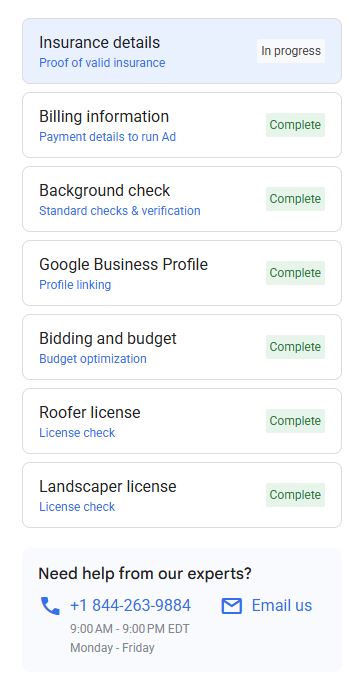
Depending on category and location, Google may ask for a business licence, trade licence, proof of insurance and background checks on the owner and sometimes on field staff. Some categories need all of these, some need fewer. Google runs the checks itself, often through partner providers, and timelines are outside anyone else's control.
- Current licence documents in the exact business name on the account
- Insurance certificate with coverage dates that are not about to expire
- Owner and staff details ready for screening where required
- A contact who checks email for verification requests
4. Service areas
Draw service areas around where you want to drive, not where you could possibly reach. A wide radius produces more leads on paper and more unbookable jobs in practice. We usually start tighter around the towns you know well and widen once lead quality is proven.
5. Job types and services
Each category offers a list of job types. Turning on everything invites leads for small or unprofitable work. We switch on the job types you want more of and leave off the ones you would rather refer elsewhere, then revisit after the first month of real leads.
6. Hours, availability and budget
Your listed hours decide when ads can run. Listing 24 hour availability only makes sense if someone will genuinely answer at 2am. Budget is set weekly; we size it to the number of jobs the crew can take on and to what a booked job is worth, then move it as results come in.
7. Profile and review readiness
Homeowners choose between several businesses on one screen, so rating, review count, photos and a clear description matter. Before launch we tidy the profile and set up a simple way to ask customers for reviews after completed jobs, inside Google's rules.
8. Call and message handling
Leads arrive as calls, messages and sometimes booking requests. Decide who answers, how fast messages get a reply and what happens outside office hours. A strong account cannot rescue a lead that waits a day for a callback.
Common setup mistakes
These are the issues we see most often when we take over an account someone else opened.
- Business name on the account does not match the licence
- Every job type switched on, including work the business does not want
- Service area far larger than the crew will realistically cover
- Insurance due to expire during verification, forcing a resubmission
- Personal mobile number listed, so calls go unanswered on site
- Budget set once and never revisited
Launch checklist and who does what
We handle account configuration, category and job type choices, service areas, profile content, budget settings and the review process. You provide licence and insurance documents, owner details for screening, a reliable phone and someone to answer it. We cannot bypass or speed up Google's verification. We can make sure nothing on our side is the reason it stalls.